"Proxy Server Setup" Window
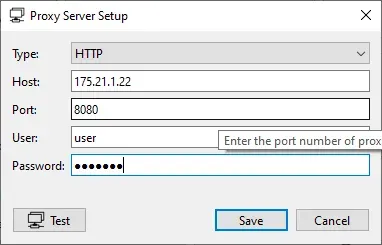
The window can be opened with the button “Proxy Settings” on the tab “General Settings” or on the tab “Activation Dialog ASTER”.
You can select (HTTP or SOCKS5) from the “Type” drop down
In the “Host” field - enter the name (or IP-Address) of the proxy server.
In the “Port” field - enter the proxy server port.
If the proxy server requires authentication when connecting to it, then enter the username and password in the «User» and «Password» fields respectively.
Click the “Тest” button to check the connection with the proxy server.
To save or cancel the changes click “Save” or “Cancel”button.